We have 10 new netbooks available for GPC faculty, staff, and student use (not available for check out to UB patrons or retired/foundation patrons.) The netbooks are stored in the same cabinet as the laptops.
When checking them out to students, treat them the same as you would a laptop. They have a 2 hour check out period.
Taped on the inside of the cabinet door is an inventory of the items.
If you have any questions regarding the netbooks, please feel free to ask me.
-Susan
Showing posts with label laptops. Show all posts
Showing posts with label laptops. Show all posts
Friday, June 3, 2011

Wednesday, September 1, 2010
Wireless Disconnect Fix
If you haven't been following the reference blog, they posted an interesting entry about laptops not connecting to the wireless network:
http://claref.blogspot.com/2010/08/laptop-wireless-disconnect-fix.html
It may be of some assistence if you have students who check out reserve laptops and have trouble logging on to the internet.
Susan
http://claref.blogspot.com/2010/08/laptop-wireless-disconnect-fix.html
It may be of some assistence if you have students who check out reserve laptops and have trouble logging on to the internet.
Susan
Monday, November 9, 2009
Laptops
EDIT
Laptop 1 has been fixed by OIT. If any of the patrons complain of laptops going into "Maintenance Mode", please put that computer to the side and notify me. These computers will more than likely need to be fixed by OIT (it has something to do with the clock on the computer and Deep Freeze, which requires Administrator privileges, accessible only by OIT.)
------------------------------------------------------------------------------------
We've had several problems regarding the laptops in the past week. Here's a quick rundown:
Laptop 1: When the laptop starts up, it automatically goes into Maintenance Mode and disables the keyboard and mouse. OIT is supposed to come and take a look at it. The laptop is in the cabinet with all of the other laptops in the reserve room. It has a visible sign on it so you'll know that it's for OIT.
Jerome was kind enough to test if the laptops/cords/laptop bags triggers the alarm. Unfortunately, all of them did not, but I have gone ahead and put new sensitized strips on all the items. That should--hopefully--fix the problem.
Laptop 8: This was charged out to a patron (C. Littlejohn) who walked out with the laptop. He has since then returned the laptop.
Kindly remind students (and I know that you all do anyway) that laptops are for use within the library only.
Also, please advise students that if they want to save their documents, that the desktop or hard drive of the computers are not the best place for them. If the computers shut down for any reason, these documents will be lost. We use Deep Freeze on the laptops, which wipe all downloaded or saved info on the computer.
Thank you all so much for your diligence and help in this rough patch with the laptops.
Laptop 1 has been fixed by OIT. If any of the patrons complain of laptops going into "Maintenance Mode", please put that computer to the side and notify me. These computers will more than likely need to be fixed by OIT (it has something to do with the clock on the computer and Deep Freeze, which requires Administrator privileges, accessible only by OIT.)
------------------------------------------------------------------------------------
We've had several problems regarding the laptops in the past week. Here's a quick rundown:
Laptop 1: When the laptop starts up, it automatically goes into Maintenance Mode and disables the keyboard and mouse. OIT is supposed to come and take a look at it. The laptop is in the cabinet with all of the other laptops in the reserve room. It has a visible sign on it so you'll know that it's for OIT.
Jerome was kind enough to test if the laptops/cords/laptop bags triggers the alarm. Unfortunately, all of them did not, but I have gone ahead and put new sensitized strips on all the items. That should--hopefully--fix the problem.
Laptop 8: This was charged out to a patron (C. Littlejohn) who walked out with the laptop. He has since then returned the laptop.
Kindly remind students (and I know that you all do anyway) that laptops are for use within the library only.
Also, please advise students that if they want to save their documents, that the desktop or hard drive of the computers are not the best place for them. If the computers shut down for any reason, these documents will be lost. We use Deep Freeze on the laptops, which wipe all downloaded or saved info on the computer.
Thank you all so much for your diligence and help in this rough patch with the laptops.
Wednesday, October 7, 2009
Blue Screen on Laptop L-5
We had a student return laptop L-5 to the Circulation Desk reporting that when she started it up, it had a blue screen similar to this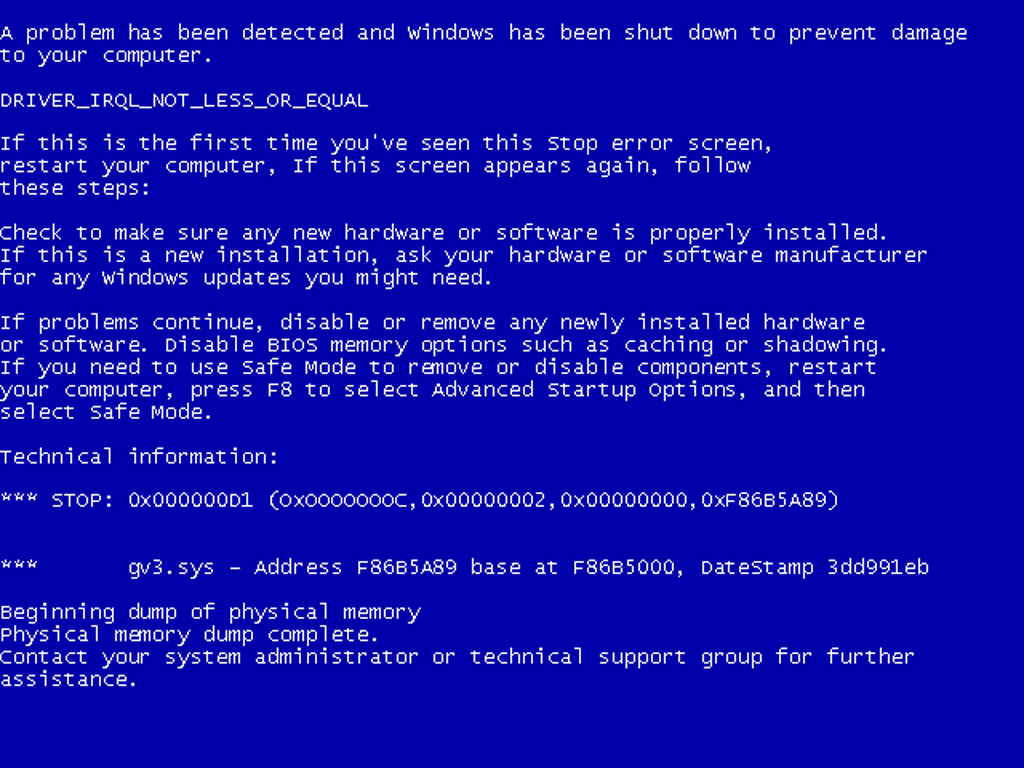 :
:
I restarted the computer and it booted up fine. However, if this problem reoccurs on laptop L-5 (or if you notice that this is happening repeatedly to any of the other laptops), please notify one of the full-time Circulation staff members and we'll report it to OIT and have them take a look at it. Thanks!
:I restarted the computer and it booted up fine. However, if this problem reoccurs on laptop L-5 (or if you notice that this is happening repeatedly to any of the other laptops), please notify one of the full-time Circulation staff members and we'll report it to OIT and have them take a look at it. Thanks!
Friday, October 2, 2009
Update - Problem with online laptop renewals
Ameet reported back in early September that patrons were not able to renew their laptops online (See September 9th post.) It turns out this glitch is a known bug, and has been fixed in v. 7.1.1 of the OPAC. Unfortunately, it doesn't look like we'll be upgrading to 7.1.1 anytime soon.
This means that you will need continue to inform everyone that they will have to bring laptops back to the desk for renewal.
You may also want to warn them that, due to a system bug, they will be unable to renew any of their other materials, online, as long as they have the laptop charged out. They should, however, still be able to place requests on materials in the OPAC, check the GALILEO password, etc.
This means that you will need continue to inform everyone that they will have to bring laptops back to the desk for renewal.
Thursday, September 10, 2009
Non-functioning Laptop for OIT
Please note that OIT will be coming by the Circulation Desk to pick up a non-functioning laptop. The laptop is located in the Reserves room next to the metal cabinet, and is labeled "Hold for OIT."
Wednesday, September 9, 2009
Problem with online laptop renewals
It looks like there is a glitch with the laptops in Voyager. Basically, students are not able to renew laptops online. Tessa is looking into it and, hopefully, this is a temporary problem that should be fixed by tomorrow.
In the meantime (i.e. Wednesday evening and Thursday morning) please ask students to lug those laptops to the desk to renew.
In the meantime (i.e. Wednesday evening and Thursday morning) please ask students to lug those laptops to the desk to renew.
Wednesday, July 29, 2009
LAPTOPS! Now... 2 hour checkout
...with 2 renewals allowed!
Beginning tomorrow, the laptop circulation period will be reduced to two hours (currently it is three hours). Patrons will be able to renew laptops twice, and can renew them online by logging into their GIL account (so, no more dragging the machine to the circ desk).
PLEASE, let everyone who checks out a laptop know about the change. Thanks and feel free to contact me with any questions.
Beginning tomorrow, the laptop circulation period will be reduced to two hours (currently it is three hours). Patrons will be able to renew laptops twice, and can renew them online by logging into their GIL account (so, no more dragging the machine to the circ desk).
PLEASE, let everyone who checks out a laptop know about the change. Thanks and feel free to contact me with any questions.
Thursday, July 16, 2009
Laptop is fixed
OIT fixed the monitor on the laptop (see previous post), so we are back to our full complement of 10 laptops in the metal cabinet.
Thanks, and please feel free to pass on any additional issues you experience with the laptops.
Thanks, and please feel free to pass on any additional issues you experience with the laptops.
Monday, July 13, 2009
Minus one laptop
You may notice one laptop missing from the steel case in the Reserves room. It was removed because the monitor is not working properly, and OIT will be repairing or replacing it over the next few weeks.
Subscribe to:
Posts (Atom)